Jumat, 14 Oktober 2011
Sabtu, 08 Oktober 2011
Minggu, 25 September 2011
Senin, 18 April 2011
N-Gage Review
Label: NokiaOke, in this post, i will Review about my first phone.At the first time i had a phone is N-gage QD, it’s a gamer phone. Views such as the game boots antiquity that often we play our era-era elementary school. Weight N-Gage QD is 137 g, with an internal antenna Operating Band GSM (900, 1800, 1900) and Network Data Support CSD, GPRS Class 4, HSCSD.Nokia has stressed that the new N-Gage QD isn't N-Gage 2.0, but rather still based on the original platform. The 2.0 platform will not be expected to surface until 2005 at the earliest. The N-Gage QD is built upon the existing N-Gage platform but has some improved features that should have been on the original.
Since we will be comparing the original N-Gage and the new N-Gage QD quite extensively, it can be quite confusing distinguishing which one is being referenced. For simplicity's sake, further mention of the original N-Gage will be "N-Gage" while the recently released improved N-Gage QD will be called "N-Gage QD" or simply "QD."
Design
One of the first noticeable changes was the design of the N-Gage QD. The original N-Gage's microphone and speaker were located on the top. This forced users to hold the phone on edge. Due to the N-Gage's shape, the term "taco phone" or "elephant ear" came to be synonymous with embarrassed users talking on the N-Gage. Many people complained about it's awkward shape and even more awkward design as a phone.
Nokia listened and created the QD to have the earpiece and speaker on the front allowing for a much more natural way of answering the phone. Additionally, the dimensions are slightly smaller at 118 x 68 x 22 mm, compared to the 133 x 70 x 22 mm of the N-Gage. But unfortunately, that makes the N-Gage QD slightly harder to grip.
The N-Gage QD keypad has been altered as well. Many consumers have complained that the original N-Gage's keypad was too stiff to be used comfortably. Fortunately, the QD has been redesigned to include a more responsive keypad.The directional keypad has also lost the ability to be pressed down. Instead of a 5-way keypad, the QD has a 4-way keypad with an extra button below. As to if this is better or not will depend on the user. Some may find it frustrating to pick up their thumb to press the button, while others may find the change refreshing.
Although some changes were cosmetic, others are functional. A major concern about the N-Gage was the hassle of changing games. Users needed to turn off the unit, remove the back cover, and then take out the battery in order to finally get to the game slot. Since this made swapping games difficult and time consuming, Nokia has designed the N-Gage QD have the ability to hot swap through a side compartment.
Basic Features
The basic features of the N-Gage QD are mostly unchanged from the original. However, the phone is now either dual-band GSM 850 / 1900 (Americas) or GSM 900 / 1800 (Europe, Asia, and Africa). The original N-Gage was tri-band 900 / 1800 / 1900.
Now the QD will not be able to used worldwide. However, this is not necessarily a drawback. For U.S. consumers, the addition of the 850 MHz frequency allows the QD to work across Cingular and AT&T's mixed networks where the original could not before.
The QD's operating platform is the Symbian 6.1 OS, not 7 like other Nokia phones. Nokia has also managed to increase its battery life from the original 6 hours of gameplay, to the new QD's 10 hours by bumping up the battery from 850 mAh to 1070 mAh.
Nokia N8 Review & Price
Diposting oleh
Belajar Online Shop
di
03.58
0
komentar
Nokia N8 Review & Prices, Specifications and Prices Review Nokia N8. The biggest feature on the Nokia N8 is a 12 megapixel camera with Carl Zeiss optics and Xenon flash. Features sensor is substantially greater than ever used in another Nokia device, even larger than many found in a special camera.
Nokia N8 also introduced the ability to record high-definition video and edit it with smart built-in suite of editing on the device. Playback quality is just as important, and 3.5-inch touch screen capacitive HD is an ideal window to assess the film and footage. There is also an HDMI connector allows you to connect your smartphone to your HD TV and share your media with friends and family in superb quality.
Complete specifications and pricing Mobile Nokia N8:
Dimension Size
113.5 x 59 x 12.9 mm
Views
* Screen size: 3.5 "
* Resolution: 16:09 nHD (640 x 360 pixels) OLED
* 16.7 million colors
* Capacitive Touch screen
* The orientation sensor (Accelerometer)
* Compass (Magnetometer)
* Proximity sensor
* Ambient light detector
Data Network
* GPRS / EDGE class B, multislot class 33
* Cat9 HSDPA, maximum speed up to 10.2 Mbps, 2.0 Mbps HSUPA CAT5
* WLAN IEEE802.11 b / g / n
* Support TCP / IP
* Can be used as a modem
* Support for MS Outlook synchronization of contacts, calendar and notes
Memory
* Internal Memory: 16 GB
* MicroSD memory card slot, hot swappable, up to 32 GB
Operating Frequency
* GSM / EDGE 850/900/1800/1900
* WCDMA 850/900/1700/1900/2100
* Automatic switching between band WCDMA & GSM
* Flight mode
Connectivity
* Bluetooth 3.0
* HDMI
* 2mm charging connector
* Micro USB charging
* High-Speed USB 2.0 (micro USB connector)
* 3.5 mm AV connector
Platform Software & User Interface
* ^ 3 for Nokia Symbian
* Java MIDP 2.1
* Qt 4.6.2, Web Runtime 7.2
* Flash Lite 4.0
* 1.2 OMA DM, OMA Client Provisioning 1.1
Applications
* Key Applications: Calendar, Contacts, music player, internet, messages, photos, Ovi Store, Maps, Video, WebTV, Office document editor, Video & photo editor, Mail, Chat, Radio
* PC Application: Nokia Ovi Suite, Nokia Ovi Player
Personal Information Management (PIM)
* Further information contacts
* Calendar
* To-do list
* Note
* Recorder
* Calculator
* Hours
Email and Messaging
* Email client with attachment support for images, videos, music and documents doc, Xls, Ppt, Pdf, Zip
* HTML format for email
* Unified e-mail client for several protocols: Yahoo Mail, Gmail, Windows Live, Hotmail and / POP IMAP other popular services, Mail for Exchange, IBM Lotus traveler
* Editing a document key office
* Email Web Widgets on the home page
* Support for instant messaging Chat: OVI Chat, Yahoo, AIM, Windows Live, Gtalk, MySpace *
* Unified MMS / SMS editor
* The Conversations for SMS
* Push email and Nokia Messenger
* Display standard web pages
* Web browsing with touch controls
* Supports: HTML, XHTML MP, WML, CSS
* Supported protocols: HTTP v1.1, WAP
* Support TCP / IP
* History, HTML and JavaScript support
* Flash Lite 4 will support most of the content of Flash Player 10.1
* Nokia Mobile Search
* RSS reader
* Support for video streaming
* Direct access from the main page up and Twitter via Ovi by Nokia Social client
* Social networking profile visible in phone contact
* Upload and view photos and videos and view the location of the client through the Ovi by Nokia Social client
* Social networking is seen in a phone events calendar
GPS and Navigation
* Integrated GPS, A-GPS receiver
* Ovi Maps with free car and pedestrian navigation
* Wi-Fi Positioning
* Compass and accelerometer for screen orientation
* Nokia Ovi Suite to transfer / upload maps to the phone memory
Camera
* 12 megapixel camera with Carl Zeiss optics
* Fullscreen 16:09 View finder with a parameter easy to use touchscreen
* Xenon flash
* Face Detection
* Autofocus
* Focal length: 5.9 mm
* No. F / Aperture: F2.8
* Image file format: JPEG / EXIF
* Zoom up to 2x (digital) for still images
* 3x zoom (digital) for video
* Secondary camera for video calling (VGA, 640 x 480 pixels)
Share Video and Player
* HD playback 720p HD video on a TV via an HDMI cable
* Dolby Digital Plus surround sound while playing with HDMI & home theater
* Support for download, streaming and progressive download
* Video editing software
* Video applications: collection of stored videos
* WebTV On Demand widget for watching streaming TV
* Support for Flash video
* YouTube browsing and streaming
* Support for video call (WCDMA network services)
Music Features
* Cover Album to browse your music collection
* Paid Music Service
* Nokia Music Player
* Ovi Music Store
* MP3, WMA, AAC, eAAC, eAAC +, AMR-NB, AMR-WB, E-AC-3, AC-3
* Bit rate to 320 kbps
* DRM support for WM DRM, OMA DRM 2.0
* FM transmitter
Game
* To play games using the touch screen
* Graphics processor with OpenGL 2.0 to run 3D graphics
* Java Game
* Using the accelerometer (horizontal screen) to play games
Prices New and Used Mobile Nokia N8:
Nokia N8 also introduced the ability to record high-definition video and edit it with smart built-in suite of editing on the device. Playback quality is just as important, and 3.5-inch touch screen capacitive HD is an ideal window to assess the film and footage. There is also an HDMI connector allows you to connect your smartphone to your HD TV and share your media with friends and family in superb quality.
Complete specifications and pricing Mobile Nokia N8:
Dimension Size
113.5 x 59 x 12.9 mm
Views
* Screen size: 3.5 "
* Resolution: 16:09 nHD (640 x 360 pixels) OLED
* 16.7 million colors
* Capacitive Touch screen
* The orientation sensor (Accelerometer)
* Compass (Magnetometer)
* Proximity sensor
* Ambient light detector
Data Network
* GPRS / EDGE class B, multislot class 33
* Cat9 HSDPA, maximum speed up to 10.2 Mbps, 2.0 Mbps HSUPA CAT5
* WLAN IEEE802.11 b / g / n
* Support TCP / IP
* Can be used as a modem
* Support for MS Outlook synchronization of contacts, calendar and notes
Memory
* Internal Memory: 16 GB
* MicroSD memory card slot, hot swappable, up to 32 GB
Operating Frequency
* GSM / EDGE 850/900/1800/1900
* WCDMA 850/900/1700/1900/2100
* Automatic switching between band WCDMA & GSM
* Flight mode
Connectivity
* Bluetooth 3.0
* HDMI
* 2mm charging connector
* Micro USB charging
* High-Speed USB 2.0 (micro USB connector)
* 3.5 mm AV connector
Platform Software & User Interface
* ^ 3 for Nokia Symbian
* Java MIDP 2.1
* Qt 4.6.2, Web Runtime 7.2
* Flash Lite 4.0
* 1.2 OMA DM, OMA Client Provisioning 1.1
Applications
* Key Applications: Calendar, Contacts, music player, internet, messages, photos, Ovi Store, Maps, Video, WebTV, Office document editor, Video & photo editor, Mail, Chat, Radio
* PC Application: Nokia Ovi Suite, Nokia Ovi Player
Personal Information Management (PIM)
* Further information contacts
* Calendar
* To-do list
* Note
* Recorder
* Calculator
* Hours
Email and Messaging
* Email client with attachment support for images, videos, music and documents doc, Xls, Ppt, Pdf, Zip
* HTML format for email
* Unified e-mail client for several protocols: Yahoo Mail, Gmail, Windows Live, Hotmail and / POP IMAP other popular services, Mail for Exchange, IBM Lotus traveler
* Editing a document key office
* Email Web Widgets on the home page
* Support for instant messaging Chat: OVI Chat, Yahoo, AIM, Windows Live, Gtalk, MySpace *
* Unified MMS / SMS editor
* The Conversations for SMS
* Push email and Nokia Messenger
* Display standard web pages
* Web browsing with touch controls
* Supports: HTML, XHTML MP, WML, CSS
* Supported protocols: HTTP v1.1, WAP
* Support TCP / IP
* History, HTML and JavaScript support
* Flash Lite 4 will support most of the content of Flash Player 10.1
* Nokia Mobile Search
* RSS reader
* Support for video streaming
* Direct access from the main page up and Twitter via Ovi by Nokia Social client
* Social networking profile visible in phone contact
* Upload and view photos and videos and view the location of the client through the Ovi by Nokia Social client
* Social networking is seen in a phone events calendar
GPS and Navigation
* Integrated GPS, A-GPS receiver
* Ovi Maps with free car and pedestrian navigation
* Wi-Fi Positioning
* Compass and accelerometer for screen orientation
* Nokia Ovi Suite to transfer / upload maps to the phone memory
Camera
* 12 megapixel camera with Carl Zeiss optics
* Fullscreen 16:09 View finder with a parameter easy to use touchscreen
* Xenon flash
* Face Detection
* Autofocus
* Focal length: 5.9 mm
* No. F / Aperture: F2.8
* Image file format: JPEG / EXIF
* Zoom up to 2x (digital) for still images
* 3x zoom (digital) for video
* Secondary camera for video calling (VGA, 640 x 480 pixels)
Share Video and Player
* HD playback 720p HD video on a TV via an HDMI cable
* Dolby Digital Plus surround sound while playing with HDMI & home theater
* Support for download, streaming and progressive download
* Video editing software
* Video applications: collection of stored videos
* WebTV On Demand widget for watching streaming TV
* Support for Flash video
* YouTube browsing and streaming
* Support for video call (WCDMA network services)
Music Features
* Cover Album to browse your music collection
* Paid Music Service
* Nokia Music Player
* Ovi Music Store
* MP3, WMA, AAC, eAAC, eAAC +, AMR-NB, AMR-WB, E-AC-3, AC-3
* Bit rate to 320 kbps
* DRM support for WM DRM, OMA DRM 2.0
* FM transmitter
Game
* To play games using the touch screen
* Graphics processor with OpenGL 2.0 to run 3D graphics
* Java Game
* Using the accelerometer (horizontal screen) to play games
Prices New and Used Mobile Nokia N8:
N81 review
Diposting oleh
Belajar Online Shop
di
03.21
0
komentar
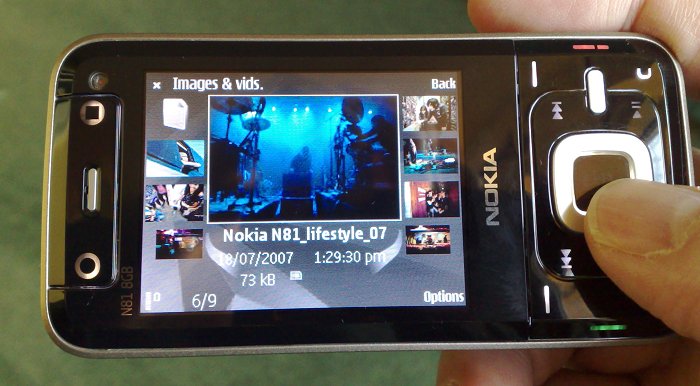
Nokia phones presents a slide variants that I know is the N81. The phone is quite attractive, with dark blue color.
In this post, I’ll go in-depth with the form factor of the phone and how it is related to the functions. I’ll review about using the Nokia N81 8GB interface and software in a later post. For the the physical aspects of the N81 8GB, I think the phone is well designed and nicely built, but it has a few annoyances. You might also want to read my preview of the Nokia N81 8GB and watch my unboxing video of the N81 along with this review.
Overview
Weight. The Nokia N81 8GB feels heavier in the hands than the Nokia N95. In my preview of the Nokia N81 8GB, I mentioned that the N81 weighs 140 grams, while the N95 weighs 120 grams. It doesn’t look like a big difference, but you can certainly feel it when you hold both of them.
Display. The Nokia N81 has a 2.4 inch display. It is the same screen size as the Nokia N93i. However, it is hard to settle down for this size, knowing that the Nokia N95 8GB has a 2.8 inch screen. I also like that the display is protected by another layer instead of just flat with the whole fascia.
Color. According to the box, the Nokia N81 8GB is warm silver/brown. From an arm’s length, the front of the phone looks like it is black with mocha on the sides. A closer look of the back of the phone shows tiny speckles that shine as light reflects from the panel. Nice and subtle.
Slide. The sliding mechanism is firm. You do not need to slide it in place all the way. It moves by itself with a nice snapping sound when you push it up or down halfway through.
Buttons
When the N81 8GB is closed while hiding the numeric keypad, I counted 18 buttons just on the front part of the phone! If two of those buttons are the dedicated gaming keys, that means the other 16 buttons are packed together with the Naviwheel. Let’s see the keys in that area: green call, red end-call, left soft-key, right soft-key, main menu, multimedia menu, clear, play/pause, stop, forward, back, left, right, up, down, and center.
Even though there’s a lot of buttons in that part of the phone, Nokia does a great job illuminating only the necessary buttons depending on what you are using. For example, the music keys are dimmed and the gaming keys are off when using the phone in general. When the music player is on, the music keys light up. The gaming keys lights up when playing an N-gage game and also when used to zoom in or out of photos in the gallery.
Naviwheel. What surprised me is that the Naviwheel, which is supposed to work like the iPod wheel navigation, is off by default. You have to go to the settings to turn it on. The Naviwheel navigation is only useable in the multimedia menu, music player, and photo gallery. I am not sure whether future firmware updates will enable it throughout the whole phone. However, I’m glad they provide the option of turning it on or off, instead of leaving it on by default. After playing with it, I actually just prefer turning the Naviwheel option off.
I also found the Naviwheel very sturdy, requiring a lot of effort to press down. While it may not be a major problem to some, I found it annoying to press down hard when scrolling through web pages.
Music keys. You can press the play button at any time to play the last song you were listening to. What’s cool is that you can do this while doing something else like browsing the web, checking email, or even playing a game. I also like that the title of the song pops up on the upper right corner display if I am not currently not on the music player display.
Keyguard slide. Next to the power button is the key lock that slides to the right and goes back to its original position. This comes in real handy if you do not want the music to play randomly while your phone is inside your bag. I was in a really quiet hallway yesterday with the Nokia N81 in my backpack and it scared the hell out of me when something just played out of nowhere. However, you can choose to turn the keyguard option on automatically when closing the slide in the settings. This option is not available in my Nokia N95.
Pencil Key. There’s no pencil key in the Nokia N81, which you can find in other Nseries phones. It is useful in copying and pasting text, but since this button is not available in the N81, Nokia provided “Editing options” in the menu where copy and paste are available. It does not bother me that the pencil key is gone because the same options can be brought up by pressing the * button while texting as well. More details on that on my software and interface review of the Nokia N81.
Camera button. There is no auto focus on the 2-megapixel camera of the Nokia N81. That means you can’t hold the camera button halfway to focus on your subject. This means snapping pictures is really quick, but don’t expect the same quality from the Nokia N95 with autofocus.
There is no auto focus on the Nokia N81 8GB camera.
Power. The power button works similar to any other Nseries phone. You tap once to bring up profiles like silent, normal, vibrate, etc… then keep tapping to go down the list. Hold it again to activate the desired profile. If I want to turn it off, I just hold the button down.
Volume Keys. Nothing special about the volume keys! Volume up… volume down.
Input and Output
Earphones. The Nokia N81 8GB came with earphones that go around the back of your neck. It connects to a middle piece where you can control music or pick up phone calls. I prefer regular earphones that go down my neck, but joggers like the ones that go around the neck because it doesn’t fall out easily. You can also use your own earphones if you like, but, people are starting to use bluetooth headphones to listen to music on their phones. You can find out more about Nokia’s new bluetooth headsets at Non Stop Living.
Listening to music with the included earphones.
Micro-USB. The Nokia N81 includes a micro-USB port for data transfers with our computers. We are going to see this in many upcoming phones and I love it! I can lose my USB cable, and know that I can go into any electronics store to buy one right away if I don’t have a spare one lying around.
Speakers. I mentioned in my preview of the Nokia N81 8GB, it has really loud speakers. I get to experience it first-hand. It is definitely loud enough to start a small party anywhere!
Maybe enough from me.
Langganan:
Komentar (Atom)